Previous Chapter: 6 Technologies, Interoperability, and Risk Management
Suggested Citation: "7 Self-Assessment Tool." National Academies of Sciences, Engineering, and Medicine. 2025. Framework and Tools for Incorporating Technologies into Airport In-Terminal Concessions Programs. Washington, DC: The National Academies Press. doi: 10.17226/29145.

CHAPTER 7

Self-Assessment Tool

As part of the Framework, the research team developed a Self-Assessment Tool (the tool) to assist airports in assessing the maturity of their existing concessions technology program. The Self-Assessment Tool is available on the National Academies Press website (nap.nationalacademies.org) by searching for ACRP Research Report 279: Framework and Tools for Incorporating Technologies into Airport In-Terminal Concessions Programs and looking under “Resources.” This chapter presents an overview of the tool and instructions for using it.

7.1 Overview

The tool is a spreadsheet developed in Microsoft Excel that prompts for Yes/No responses to questions and then automatically displays maturity levels for each of the 11 domain (challenge) areas addressed in the ACRP 03-70 project. Along with the maturity level rating, recommendations are provided for potential improvements to the concessions technology program. This tool can be used to help develop an airport’s roadmap for its concessions technology program on the basis of its current maturity assessment.

To assist in the visualization of the results, the tool also provides a dashboard. The tool has three worksheet tabs: Introduction, Self-Assessment, and Dashboard. Macros are used to provide a Reset Form feature. Macros will need to be enabled to use this feature. Page samples follow.

7.2 Introduction Page

This page provides an overview of the objective of this tool, along with instructions for its use. Figure 25 depicts a screenshot of the tool instructions.

7.3 Self-Assessment Page

The Self-Assessment worksheet highlights in yellow the input cells that require data entry. A sample of the data entry fields is shown in Figure 26. Once all questions are answered for an area, the maturity level will be displayed to the right of the answers.

Maturity levels are based on the percentage of “Yes” versus “No” answers to the questions for each domain area. It is possible to answer “No” to one or two questions in some domain areas and still receive a high maturity level.

Suggested Citation: "7 Self-Assessment Tool." National Academies of Sciences, Engineering, and Medicine. 2025. Framework and Tools for Incorporating Technologies into Airport In-Terminal Concessions Programs. Washington, DC: The National Academies Press. doi: 10.17226/29145.
The information given in the text box is as follows: INSTRUCTIONS: (All inputs are on the Self-Assessment tab). 1, On the Self-Assessment tab, use the radio buttons to answer “Yes” or “No” for each of the questions in all DOMAIN Areas. Input is only required in the yellow fields. 2, Once all questions are answered for a DOMAIN Area, the Maturity Level for that DOMAIN Area will change to identify the current status. 3, After all the questions are answered, proceed to the Dashboard tab to see a graphical representation of the current Concession Technology Program recommendations for suggested areas of improvement. 4, As recommendations are implemented to your concession technology program, update the relevant questions to reflect improvements. 5, The Self-Assessment and Dashboard pages can be printed to document current conditions. Notes: 1, Maturity Levels are a HIGH, MEDIUM, or LOW designation based on the percentage of “Yes” answers. 2, Maturity Levels result in the following Assessment Summaries: If the Maturity Level is High, the Assessment Summary is Adequate. If the Maturity Level is Medium, the Assessment Summary is Needs Improvement. If the Maturity Level is Low, the Assessment Summary is Needs Immediate Attention. 3, The tool will automatically update Maturity Levels and Assessment Summaries as answers are updated. 4, Save the Self-Assessment form each time you make changes, to document progress. 5, Use the Reset button to clear all Self-Assessment answers. It is recommended that you save your work before resetting the form. Beneath these instructions are two buttons: GO TO SELF-ASSESSMENT and GO TO DASHBOARD.
Figure 25. Instructions for the Self-Assessment Tool.
Suggested Citation: "7 Self-Assessment Tool." National Academies of Sciences, Engineering, and Medicine. 2025. Framework and Tools for Incorporating Technologies into Airport In-Terminal Concessions Programs. Washington, DC: The National Academies Press. doi: 10.17226/29145.
The table consists of four columns with headers Assessment Questions by Domain, Responses, Maturity Level, and Resources. A header spanning the table reads,’ Strategic Approach or Business - IT Alignment.’ Eight questions are listed in Column 1, Assessment Questions by Domain: Do you currently have an airport concession technology program in place? Is your airport concessions technology program aligned with your organizational culture, mission, and vision? Do you have the airport senior management financial commitment for leveraging technology on your concessions program? Has your airport assessed the passenger journey touchpoints (via a journey map) to determine how it can improve its concession program? Is your potential or proposed concession technology program aligned with addressing a business need? Do you have an informal or formal airport innovation program in place which addresses the concession area? Do you have support from the concessionaires? Is your airport focused on overall technology adoption to improve its business operations and the passenger experience? In Column 2, Responses, all eight cells show two options, Yes or No, on a yellow field. Column 3 contains the following text: ‘Incomplete: The questions in this Domain Area deal with the concession technology program alignment with its strategic airport business objectives. A higher number of negative responses drives the Maturity Level down, indicating opportunities for improvement.’ Column 4, Resources, shows the following information: ‘Framework Section 4.1: Organizational Culture and Alignment with Mission or Vision.’
Figure 26. Sample of questions from the Self-Assessment section of the tool.
Suggested Citation: "7 Self-Assessment Tool." National Academies of Sciences, Engineering, and Medicine. 2025. Framework and Tools for Incorporating Technologies into Airport In-Terminal Concessions Programs. Washington, DC: The National Academies Press. doi: 10.17226/29145.
The table consists of two columns with headers Maturity Level and Assessment Summary. The assessment given to each maturity level is as follows: High maturity: Satisfactory. Medium maturity: Areas for enhancement. Low maturity: Priority focus needed.
Figure 27. Relationship of the maturity level to the assessment summary.

7.4 Assessment Summary

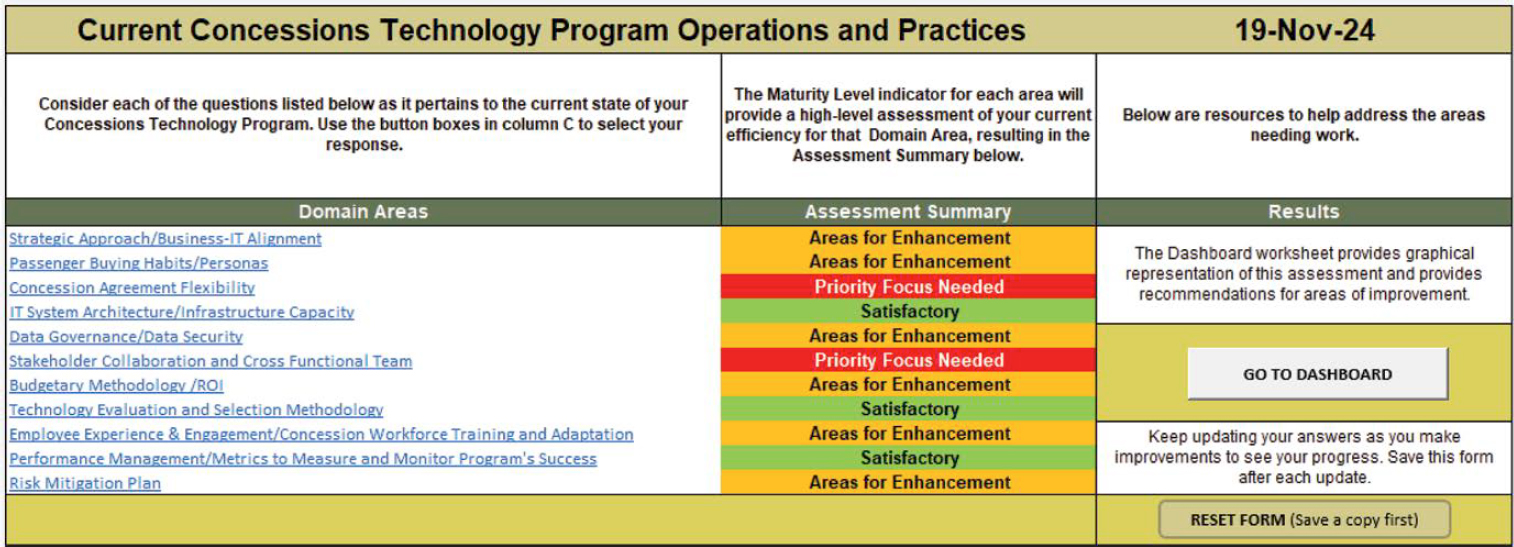
The maturity level results for each of the domain areas are equated to an assessment summary that identifies the developmental state of the concessions technology program in each area. Figure 27 shows the relationship of the maturity level to the assessment summary. Figure 28 shows a sample of an assessment summary.

7.5 Dashboard Page

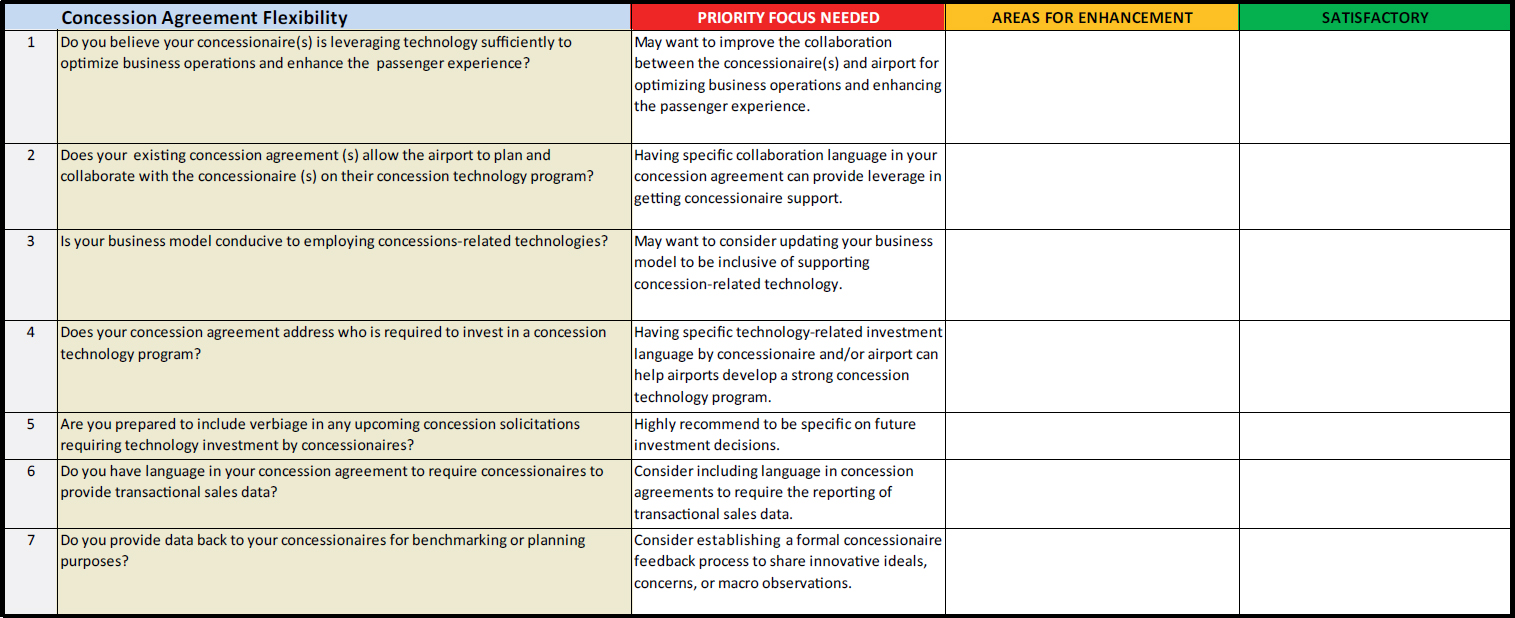
To allow the user to quickly visualize the assessment summary for each domain area, the tool provides two dynamic charts in the Dashboard, as shown in Figure 29. In addition to these charts, the tool lists recommendations under each assessment summary type to show opportunities for improving the concessions technology program (Figure 30). As answers are updated on the Self-Assessment page, the Dashboard information is updated to represent the new current conditions.
Suggested Citation: "7 Self-Assessment Tool." National Academies of Sciences, Engineering, and Medicine. 2025. Framework and Tools for Incorporating Technologies into Airport In-Terminal Concessions Programs. Washington, DC: The National Academies Press. doi: 10.17226/29145.
The main row header of the table reads, Current Concessions Technology Program Operations and Practices 19-November-2024. The table has three columns. The column headings shown in the second header row are as follows: Column 1: Consider each of the questions listed below as it pertains to the current state of your Concessions Technology Program. Use the button boxes in column C to select your response; Column 2: The Maturity Level indicator for each area will provide a high-level assessment of your current efficiency for that Domain Area, resulting in the Assessment Summary below; Column 3: Below are resources to help address the areas needing work. The column headings in the third header row are as follows: Column 1: Domain areas; Column 2, Assessment summary; and Column 3, Results. Eleven domain areas and the assessment summary for each are listed: 1, Domain Area: Strategic Approach or Business-I T Alignment; Assessment Summary: Areas for Enhancement. 2, Domain Area: Passenger Buying Habits or Personas; Assessment Summary: Areas for Enhancement. 3, Domain Area: Concession Agreement Flexibility; Assessment Summary: Priority Focus Needed. 4, Domain Area: I T System Architecture or Infrastructure Capacity; Assessment Summary: Satisfactory. 5, Domain Area: Data Governance or Data Security; Assessment Summary: Areas for Enhancement. 6, Domain Area: Stakeholder Collaboration and Cross-Functional Team; Assessment Summary: Priority Focus Needed. 7, Domain Area: Budgetary Methodology (R O I); Assessment Summary: Areas for Enhancement. 8, Domain Area: Technology Evaluation and Selection Methodology; Assessment Summary: Satisfactory. 9, Domain Area: Employee Experience and Engagement or Concession Workforce Training and Adaptation; Assessment Summary: Areas for Enhancement. 10, Domain Area: Performance Management or Metrics to Measure and Monitor Program’s Success; Assessment Summary: Satisfactory. 11, Domain Area: Risk Mitigation Plan. Assessment Summary: Areas for Enhancement. Under ‘Results’ in Column 3 are two statements accompanied by buttons to select each option: 1, ‘The Dashboard worksheet provides a graphical representation of this assessment and provides recommendations for areas of improvement’; Option - GO TO DASHBOARD. 2, ‘Keep updating your answers as you make improvements to see your progress. Save this form after each update’; Option - RESET FORM (Save a copy first).
Figure 28. Sample of an assessment summary.
Suggested Citation: "7 Self-Assessment Tool." National Academies of Sciences, Engineering, and Medicine. 2025. Framework and Tools for Incorporating Technologies into Airport In-Terminal Concessions Programs. Washington, DC: The National Academies Press. doi: 10.17226/29145.
Graph 1 is a horizontal bar graph titled ‘Maturity graph by domain areas.’ The horizontal axis shows numbers from 0 to 10 in increments of 1. The vertical axis shows 11 different domain areas. The bars are color-coded into three colors representing ‘Needs immediate attention’ (red), ‘Needs improvement’ (yellow), and ‘Adequate’ (green). The data given in the graph are as follows: Strategic Approach or Business-I T Alignment: 7.1 (needs improvement); Passenger Buying Habits or Personas: 7.8 (needs improvement); Concession Agreement Flexibility: 1.9 (needs immediate attention); IT System Architecture or Infrastructure Capacity: 8.9 (adequate); Data Governance or Data Security: 7.9 (needs improvement); Stakeholder Collaboration and Cross-Functional Team: 3.1 (needs immediate attention); Budgetary Methodology or R O I: 6.6 (needs improvement); Technology Evaluation and Selection Methodology: 8.7 (adequate); Employee Experience and Engagement or Concession Workforce...: 5.95 (needs improvement); Performance Management or Metrics to Measure and Monitor...: 7.95 (adequate); Risk Mitigation Plan: 7.4 (needs improvement). Graph 2 is a donut chart titled ‘Domain areas maturity level count.’ The graph is divided into four sections. The data given in the graph are as follows: Needs immediate attention (red): 2; Needs improvement (yellow): 6; Adequate (green): 3; Incomplete (white): 0.
Figure 29. Sample of dashboard dynamic charts.
Suggested Citation: "7 Self-Assessment Tool." National Academies of Sciences, Engineering, and Medicine. 2025. Framework and Tools for Incorporating Technologies into Airport In-Terminal Concessions Programs. Washington, DC: The National Academies Press. doi: 10.17226/29145.
The column headers of the table are 1, Concession agreement flexibility, 2, Priority focus needed, 3, Areas for enhancement, and 4, Satisfactory. The cells in Columns 3 and 4 are empty. The data given Columns 1 and 2 row-wise are as follows: 1, Do you believe your concessionaire(s) is leveraging technology sufficiently to optimize business operations and enhance the passenger experience? May want to improve the collaboration between the concessionaire(s) and airport for optimizing business operations and enhancing the passenger experience. Does your existing concession agreement(s) allow the airport to plan and collaborate with the concessionaire(s) on their concession technology program? Having specific collaboration language in your concession agreement can provide leverage in getting the concessionaire(s) support. Is your business model conducive to employing concessions-related technologies? May want to consider updating your business model to be inclusive of supporting concession-related technology. Does your concession agreement address who is required to invest in a concession technology program? Having specific technology-related investment language by concessionaire and or airport can help airports develop a strong concession technology program. Are you prepared to include verbiage in any upcoming concession solicitations requiring technology investment by concessionaires? Highly recommend to be specific on future investment decisions. Do you have language in your concession agreement to require concessionaires to provide transactional sales data? Consider including language in concession agreements to require the reporting of transactional sales data. Do you provide data back to your concessionaires for benchmarking or planning purposes? Consider establishing a formal concessionaire feedback process to share innovative ideas, concerns or macro observations.
Figure 30. Sample of recommendations by maturity level.
Suggested Citation: "7 Self-Assessment Tool." National Academies of Sciences, Engineering, and Medicine. 2025. Framework and Tools for Incorporating Technologies into Airport In-Terminal Concessions Programs. Washington, DC: The National Academies Press. doi: 10.17226/29145.
Page 53
Suggested Citation: "7 Self-Assessment Tool." National Academies of Sciences, Engineering, and Medicine. 2025. Framework and Tools for Incorporating Technologies into Airport In-Terminal Concessions Programs. Washington, DC: The National Academies Press. doi: 10.17226/29145.
Page 54
Suggested Citation: "7 Self-Assessment Tool." National Academies of Sciences, Engineering, and Medicine. 2025. Framework and Tools for Incorporating Technologies into Airport In-Terminal Concessions Programs. Washington, DC: The National Academies Press. doi: 10.17226/29145.
Page 55
Suggested Citation: "7 Self-Assessment Tool." National Academies of Sciences, Engineering, and Medicine. 2025. Framework and Tools for Incorporating Technologies into Airport In-Terminal Concessions Programs. Washington, DC: The National Academies Press. doi: 10.17226/29145.
Page 56
Suggested Citation: "7 Self-Assessment Tool." National Academies of Sciences, Engineering, and Medicine. 2025. Framework and Tools for Incorporating Technologies into Airport In-Terminal Concessions Programs. Washington, DC: The National Academies Press. doi: 10.17226/29145.
Page 57
Suggested Citation: "7 Self-Assessment Tool." National Academies of Sciences, Engineering, and Medicine. 2025. Framework and Tools for Incorporating Technologies into Airport In-Terminal Concessions Programs. Washington, DC: The National Academies Press. doi: 10.17226/29145.
Page 58
Suggested Citation: "7 Self-Assessment Tool." National Academies of Sciences, Engineering, and Medicine. 2025. Framework and Tools for Incorporating Technologies into Airport In-Terminal Concessions Programs. Washington, DC: The National Academies Press. doi: 10.17226/29145.
Page 59
Next Chapter: References
Subscribe to Email from the National Academies
Keep up with all of the activities, publications, and events by subscribing to free updates by email.